Ein Originalprompt und sein sichtbares Ergebnis
Szene 12 von 15
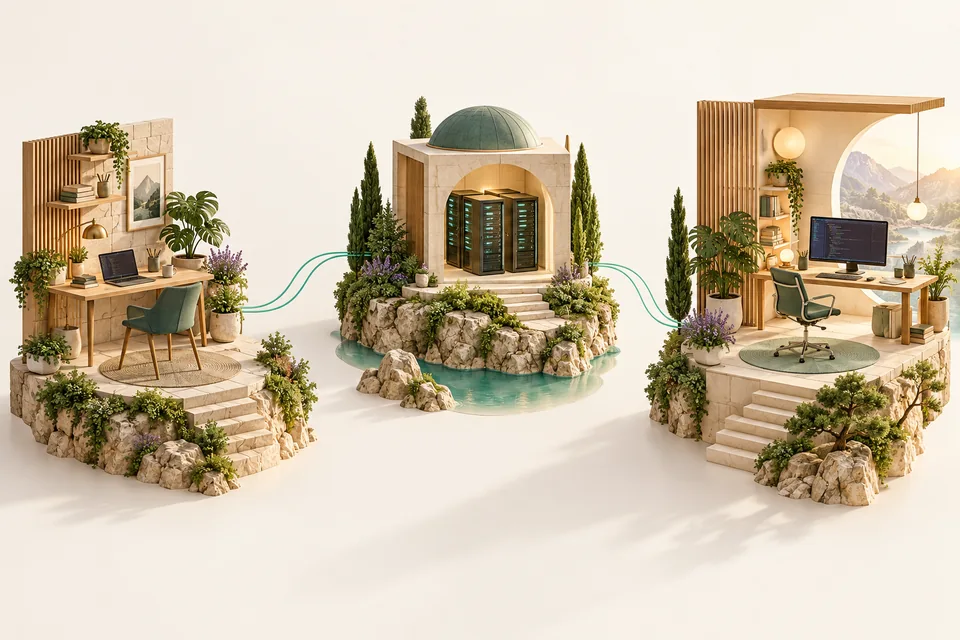
Für den bestehenden Hörsaal wurden drei Illustrationen erzeugt. Der erhaltene Prompt für „workplaces.png“ beschreibt die drei getrennten Arbeitsorte; das Bild rechts stammt aus dieser Produktion.
Erklärung
Hier ist die Verbindung von Prompt und Artefakt besonders gut nachvollziehbar: Die Originaldateien, der Bildprompt und der Umsetzungsbericht wurden zusammen erhalten. Der Prompt verlangt unter anderem drei getrennte Arbeitsorte, eine ruhige Materialwelt und keine Beschriftung. Beschriftungen und technische Erklärungen werden anschließend als echte, zugängliche Oberfläche ergänzt. Diese Trennung ist praktisch: Ein Bild schafft Orientierung und Atmosphäre, während der Text genau und veränderbar bleibt. In unserer neuen Campus-Vorlesung verwenden wir diese vorhandenen Illustrationen erneut. Sie zeigen keine tatsächliche Serveraufstellung. Vergleicht den Prompt mit dem Bild und nennt eine Anforderung, die ihr sehen könnt, sowie eine technische Behauptung, die das Bild nicht belegen kann.
Vom Gestaltungsauftrag zur Lernoberfläche
- Prompt
- Erhaltene Originalformulierung: drei getrennte Arbeitsorte, ruhige Materialien, kein Text.
- Illustration
- Original-PNG erhalten; WebP-Varianten für den bestehenden Hörsaal.
- Lehrmodell
- Beschriftung, Erklärung und Tastaturbedienung sind echte UI und unabhängig vom Bild.
Belege
Original-Bildprompt · Erzeugung dokumentiert · feat(leana): add illustrated engineering lecture pilot
2026-09-16 · docs/lernbegleiter/design/assets/engineering-lecture-2026-09-16/prompts.md · 3880de8140be11eeca13947b9300b1d20ced57ac
Use case: stylized-concept. Create one beautiful wide landscape editorial illustration for a German Engineering learning site, no text, no logos, no watermark. A warm sophisticated miniature architectural cutaway: three physically separate islands across the frame, left a personal laptop desk, middle a small isolated server sandbox pavilion, right a luminous remote coding studio with desktop monitor. Fine teal paths suggest connectivity but no files moving between machines. Premium tactile architectural model, cream stone, pale oak, evergreen and mint, soft amber sunlight, tiny lilac details, lush restrained plants, convincing materials, soft shadows, precise elegant composition. No people, no sci-fi neon. All three islands comfortably framed with margins. Quiet ivory backdrop. Wide 3:2 aspect ratio. This is decorative concept artwork, no technical labels. Save the image output for use as a web illustration.
Bildproduktion · historischer Bericht · feat(leana): add illustrated engineering lecture pilot
2026-09-16 · docs/lernbegleiter/phases/engineering-lecture-artwork-2026-09-16.md · 3880de8140be11eeca13947b9300b1d20ced57ac
# Engineering lecture — artwork and interactive teaching visuals

16 September 2026. Owner approved the concrete artwork/motion phase after the
[art direction](../design/engineering-lecture-art-direction-2026-09-16.md) was
presented. Implemented locally on the existing `ai-desktop-start` lecture; no
deployment, account changes or real infrastructure commands.

## Learner experience

Three original illustrations establish a coherent warm Engineering studio:
separate workplaces, a protected passage and a personal coding desk. Each scene
uses the relevant framed artwork. Text, commands and labelled teaching models
remain native UI, separate from the pictures. Generated architecture is a
metaphor, not a screenshot or a literal network topology.
Mit meinem Konto im Hörsaal öffnen →